思源笔记
特性
- 开源, 全平台免费(同步功能收费)
- "Notion 离线版"
- 所见即所得
- Block1
- Database
- 大纲
- 双链, 图谱
- 伺服
- 插件
安装
不需要云同步的话选原版即可.
桌面端的功能是最全的.
稳定版: 3.19
设置
- 编辑器
- 自适应宽度 y
- 两侧对齐
- TRL
- 只读模式
- 显示计数 y
- 显示网络图片角标 y
- 嵌入块面包屑
- 大纲逻辑缩进
- 列表聚焦 y
- 拼写检查
[[仅搜索文档- 代码块换行
- 代码块连字
- 代码块显示行号 y
- 虚拟引用 y
- 虚拟引用关键字包含列表
- 虚拟引用关键字排除列表
- PlantUML 伺服地址
- 动态加载块数
- 块引动态锚文本最大长度
- 反链默认展开数
- 反向提及默认展开数
- 历史生成间隔
- 历史保留天数
- 浮窗触发方式
- 字体
- 快速调整字号
- 字号 18
- Tab 空格数 4
- KaTex 宏定义
- 允许执行 HTML 块内脚本
- 星号语法 y
- 下划线语法 y
- 上下标语法 y
- 标签语法 y
- 公式语法 y
- 文档树
- 始终定位打开的文档
- 在当前页打开
- 启动时关闭所有
- 允许深度>7
- 删除不用确认 y
- 使用单行(json)保存 y
- 最大列出数量
- 页签最大数量
Ctrl+N新建位置((块引新建位置
- 闪卡
- AI
- 资源
- 导出
- 段落开头空两格
- 添加文档标题 y
- 添加 front-matter
- 引用: 锚文本块链
- 嵌入块: 原始文本|引述块
- pdf 标注引用
- pdf 页脚模板
- pdf 水印
- 图片水印
- word 模板路径
- 锚文本包裹符号
- 标签包裹符号
- 导出
- 导入
- 外观
- 模式: 跟随系统
- 主题
- 图标
- 代码块主题
- 语言
- 恢复默认窗口
- 代码片段
- 隐藏底部状态栏
- 关闭按钮设置
- 集市
- 已下载
- 插件
- 主题
- 图标
- 模板
- 挂件
- 搜索
- 快捷键
- 通用
- 命令面板
- 只读模式
- 全局搜索
- 编辑器
- 通用
- 元素
- 标题
- 列表
- 表格
- 插件
- 通用
- 账号
- 云端
- SiYuan
- S3
- WebDAV
- 发布
- 关于
- 网络伺服
界面
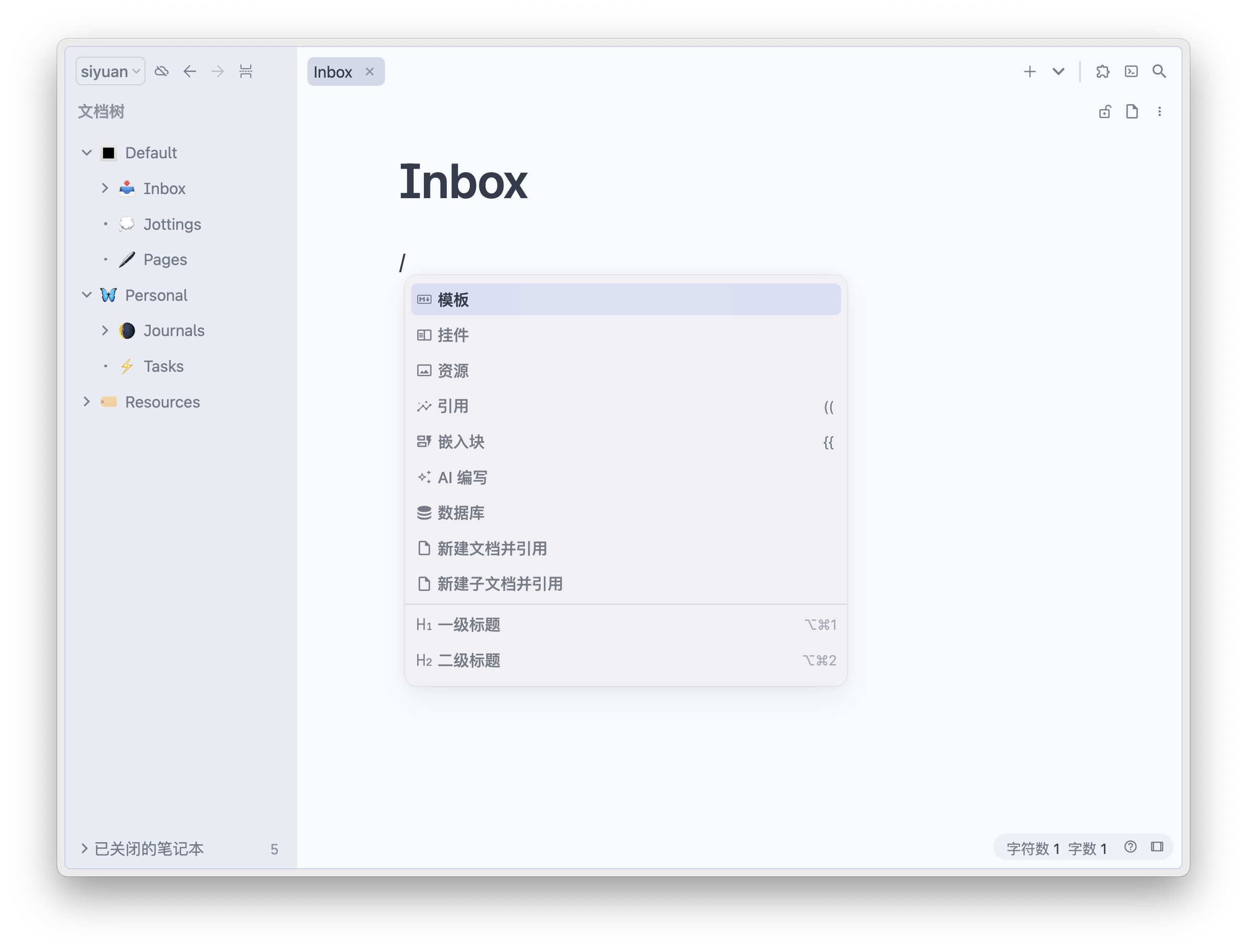
- 顶
- 主菜单
- 设置
- 面板
- 工作空间
- 布局
- 日记
- 闪卡
- 最近的文档
- 锁屏
- 数据历史
- 用户指南
- 反馈
- 开发者工具
- 退出
- 同步
- 前进后退
- 标题/标签页
- 插件
- 命令面板
- 全局搜索
- 外观模式
- 主菜单
- 底
- 左
- 文档树
- 大纲
- 收集箱
- 书签
- 标签
- 右
- 关系图
- 全局关系图
- 反向链接
- 页签内导航栏
- 锁定
- Block 菜单
- 更多
- 插入图片或文件
- 开始录音
- 网络图片转本地
- 网络资源转本地
- 上传资源文件到图床
- 刷新
- 优化排版
- 全屏切换
- 模式切换
- 只读模式
- 自适应宽度
- 计数
- Block 右键
- 转换为
- AI
- 复制
- 剪切
- 移动
- 添加到数据库
- 删除
- 聚焦
- 聚焦到上层
- 起始插入块
- 末尾插入块
- 跳转到父块的下一个块
- 跳转到父块的上一个块
- 跳转到父块
- 折叠/展开
- 属性
- 外观
- 布局
- 宽度
- 微信提醒
- 快速制卡
- 插件
- 斜杠命令
- 模板
- 挂件
- 资源
- 引用
- 嵌入块
- AI 编写
- 数据库
- 新建文档并引用
- 新建子文档并引用
- H1~6
- 无序列表、有序列表、任务列表
- 引述
- 代码块
- 表格
- 分隔线
- 公式块
- HTML
- 表情
- 链接
- 粗体、斜体、下划线、删除线
- 标记
- 上下标
- 标签
- 行级代码
- 行级公式
- 插入图片或文件、IFrame 链接、图片链接、视频链接、音频链接
- ABC、Chart、FlowChart、Graphviz、Mermaid、Mindmap、PlantUML
- 信息、成功、警告、错误、清除样式
- 编辑工具栏
- 引用
- 链接
- 外观
- BIUS
- 标记
- 上下标
- 清除行级元素
- 行级代码
- 键盘
- 标签
- 行级公式
- 备注
主题
- Savor
- Dark+
- Asri
插件
- 目录插件
- 文档层级导航
- 文档流
- 自定义块样式
- Savor Callout
- 插入时间
- 番茄工具箱
- 工具栏 Plus
- 今日笔记
- 任务列表
- 侧边备注
- 打字机模式
- 发布工具
- 集成编辑环境
- 编辑器宽度
- 行高调整
- 配色方案
- 书签+
- 叶归
挂件
代码片段
隐藏题头图
https://ld246.com/article/1635258843422
.protyle-background {
    display: none;
}
间距
https://ld246.com/article/1700551933609
https://ld246.com/article/1695626396087
.protyle-wysiwyg [data-node-id].li {
    margin: -5px 0px -5px 0px;
}

/*  正文字体占比  */
.b3-typography p,
.b3-typography [data-node-id],
.protyle-wysiwyg [data-node-id].p,
.protyle-wysiwyg p {
  line-height: 1.7em;  /* 调整行高 */
  padding: 2.3px 2px 1.5px 2px; /* 调整内边距 */
  margin-top: .8em; /* 调整上外边距 */
  margin-bottom: .4em;  /* 调整下外边距 */
}

/*h1~6标题间距*/
.protyle-wysiwyg .h1,.protyle-wysiwyg .h2,
.protyle-wysiwyg .h3,.protyle-wysiwyg .h4,
.protyle-wysiwyg .h5,.protyle-wysiwyg .h6{
	font-weight:700; /* 标题字体粗细 */
	margin-top: .8em; /* 标题上间距 */
    margin-bottom: .4em; /* 标题下间距 */
}
标题颜色
:root {
    --custom-color-my-black: #0C0C0C;
    --custom-color-my-blue: #2E75B5;
    --custom-color-my-orange: #ED7D31;
    --custom-color-my-red: #FA0000;
    --custom-color-my-red-1: #E84C22;
    --custom-color-my-yellow: #BF9000;
    --custom-color-my-green: #70AD47;
    --custom-color-my-purple: #8064A2;
    --custom-color-my-white: #FFFFFF;
    /* --custom-h1-color: #d04255; */
    /* --custom-h2-color: #d5763f; */
    /* --custom-h3-color: #e5b567; */
    /* --custom-h4-color: #a8c373; */
    /* --custom-h5-color: #6c99bb; */
    /* --custom-h6-color: #9e86c8; */
}

:root[data-theme-mode=light] {
    /* 子标题及其对应大纲颜色 | Subheadings and their corresponding outline colors */
    --custom-h1-color: var(--custom-color-my-blue);
    --custom-h2-color: var(--custom-color-my-yellow);
    --custom-h3-color: var(--custom-color-my-green);
    --custom-h4-color: var(--custom-color-my-red-1);
    --custom-h5-color: var(--custom-color-my-purple);
    --custom-h6-color: var(--custom-color-my-black);
}

:root[data-theme-mode=dark] {
    /* 子标题及其对应大纲颜色 | Subheadings and their corresponding outline colors */
    --custom-h1-color: var(--b3-card-info-color);
    --custom-h2-color: var(--b3-card-warning-color);
    --custom-h3-color: var(--b3-card-success-color);
    --custom-h4-color: var(--b3-card-error-color);
    --custom-h5-color: #B2A1C7;
    --custom-h6-color: var(--b3-theme-on-background);
}

/* 一级标题 */
.protyle-wysiwyg [data-node-id].h1,
.b3-typography h1 {
    color: var(--custom-h1-color);
}

/* 二级标题 */
.protyle-wysiwyg [data-node-id].h2,
.b3-typography h2 {
    color: var(--custom-h2-color);
}

/* 三级标题 */
.protyle-wysiwyg [data-node-id].h3,
.b3-typography h3 {
    color: var(--custom-h3-color);
}

/* 四级标题 */
.protyle-wysiwyg [data-node-id].h4,
.b3-typography h4 {
    color: var(--custom-h4-color);
}

/* 五级标题 */
.protyle-wysiwyg [data-node-id].h5,
.b3-typography h5 {
    color: var(--custom-h5-color);
}

/* 六级标题 */
.protyle-wysiwyg [data-node-id].h6,
.b3-typography h6 {
    color: var(--custom-h6-color);
}
模板
日记
可在笔记本-更多-设置中配置格式和模板
书签和标签
内容块
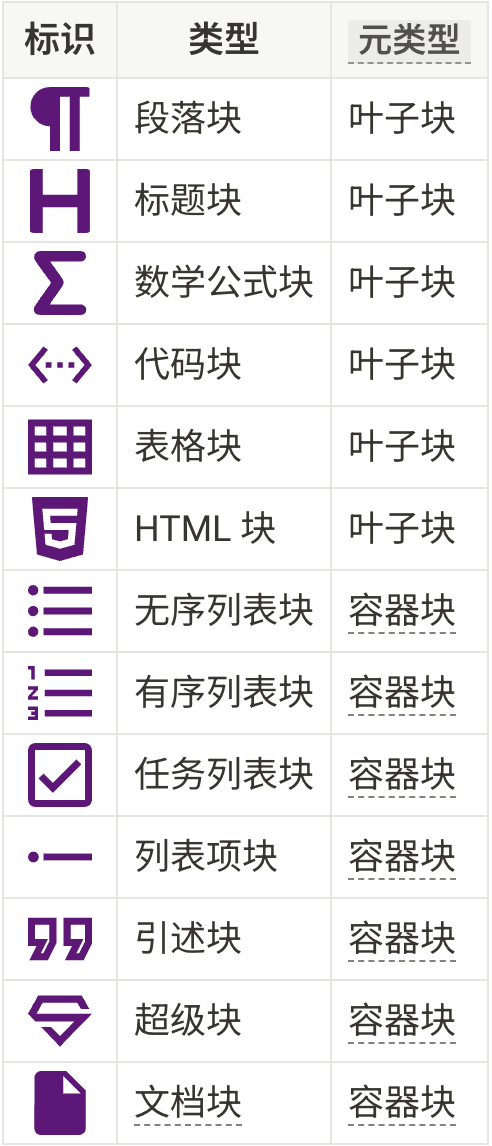
总体上还是
笔记本-文档块-非文档块结构
- NodeDocument
- NodeHeading (1级标题: "思源笔记")
- NodeHeadingC8hMarker
- NodeText ("思源笔记")
- NodeHeading (2级标题: "特性")
- NodeHeadingC8hMarker
- NodeText ("特性")
- NodeList
- NodeListItem
- NodeParagraph
- NodeText ("开源, 全平台免费(同步功能收费)")
- NodeListItem
- NodeParagraph
- NodeText ("\"Notion 离线版\"")
- NodeList
- NodeListItem
- NodeParagraph
- NodeText ("所见即所得")
- NodeListItem
- NodeParagraph
- NodeText ("Block[^1]")
- NodeListItem
- NodeParagraph
- NodeText ("Database")
- NodeListItem
- NodeParagraph
- NodeText ("大纲")
- NodeListItem
- NodeParagraph
- NodeText ("双链, 图谱")
- NodeListItem
- NodeParagraph
- NodeText ("伺服")
- NodeListItem
- NodeParagraph
- NodeText ("插件")
- NodeHeading (2级标题: "安装")
- NodeHeadingC8hMarker
- NodeText ("安装")
- NodeList
- NodeListItem
- NodeParagraph
- NodeTextMark (链接: "原版")
- NodeListItem
- NodeParagraph
- NodeTextMark (链接: "社区版")
- NodeText (" 无安卓版, 支持免登录同步, 集市很难访问")
- NodeListItem
- NodeParagraph
- NodeTextMark (链接: "unlock")
- NodeText (" 有安卓版, 支持免登录同步")
- NodeListItem
- NodeParagraph
- NodeTextMark (链接: "patch")
- NodeText (" 有安卓版(不同包名), 模拟 vip")
- NodeBlockquote
- NodeBlockquoteMarker
- NodeParagraph
- NodeText ("不需要云同步的话选原版即可.")
- NodeBlockquote
- NodeBlockquoteMarker
- NodeParagraph
- NodeText ("桌面端的功能是最全的.")
- NodeHeading (2级标题: "设置")
- NodeHeadingC8hMarker
- NodeText ("设置")
- NodeList
- NodeListItem
- NodeParagraph
- NodeText ("编辑器")
- NodeList
- NodeListItem
- NodeParagraph
- NodeText ("自适应宽度 y")
- NodeListItem
- NodeParagraph
- NodeText ("两侧对齐")
- NodeListItem
- NodeParagraph
- NodeText ("TRL")
- NodeListItem
- NodeParagraph
- NodeText ("只读模式")
- NodeListItem
- NodeParagraph
- NodeText ("显示计数 y")
- NodeListItem
- NodeParagraph
- NodeText ("显示网络图片角标 y")
- NodeListItem
- NodeParagraph
- NodeText ("嵌入块面包屑")
- NodeListItem
- NodeParagraph
- NodeText ("大纲逻辑缩进")
- NodeListItem
- NodeParagraph
- NodeText ("列表聚焦 y")
- NodeListItem
- NodeParagraph
- NodeText ("拼写检查")
- NodeListItem
- NodeParagraph
- NodeTextMark (代码: "[["), NodeText (" 仅搜索文档")
- NodeListItem
- NodeParagraph
- NodeText ("代码块换行")
- NodeListItem
- NodeParagraph
- NodeText ("代码块连字")
- NodeListItem
- NodeParagraph
- NodeText ("代码块显示行号 y")
- NodeListItem
- NodeParagraph
- NodeText ("虚拟引用 y")
- NodeListItem
- NodeParagraph
- NodeText ("虚拟引用关键字包含列表")
- NodeListItem
- NodeParagraph
- NodeText ("虚拟引用关键字排除列表")
- NodeListItem
- NodeParagraph
- NodeText ("PlantUML 伺服地址")
- NodeListItem
- NodeParagraph
- NodeText ("动态加载块数")
- NodeListItem
- NodeParagraph
- NodeText ("块引动态锚文本最大长度")
- NodeListItem
- NodeParagraph
- NodeText ("反链默认展开数")
- NodeListItem
- NodeParagraph
- NodeText ("反向提及默认展开数")
- NodeListItem
- NodeParagraph
- NodeText ("历史生成间隔")
- NodeListItem
- NodeParagraph
- NodeText ("历史保留天数")
- NodeListItem
- NodeParagraph
- NodeText ("浮窗触发方式")
- NodeListItem
- NodeParagraph
- NodeText ("字体")
- NodeListItem
- NodeParagraph
- NodeText ("快速调整字号")
- NodeListItem
- NodeParagraph
- NodeText ("字号 18")
- NodeListItem
- NodeParagraph
- NodeText ("Tab 空格数 4")
- NodeListItem
- NodeParagraph
- NodeText ("KaTex 宏定义")
- NodeListItem
- NodeParagraph
- NodeText ("允许执行 HTML 块内脚本")
- NodeListItem
- NodeParagraph
- NodeText ("星号语法 y")
- NodeListItem
- NodeParagraph
- NodeText ("下划线语法 y")
- NodeListItem
- NodeParagraph
- NodeText ("上下标语法 y")
- NodeListItem
- NodeParagraph
- NodeText ("标签语法 y")
- NodeListItem
- NodeParagraph
- NodeText ("公式语法 y")
- NodeListItem
- NodeParagraph
- NodeText ("文档树")
- NodeList
- NodeListItem
- NodeParagraph
- NodeText ("始终定位打开的文档")
- NodeListItem
- NodeParagraph
- NodeText ("在当前页打开")
- NodeListItem
- NodeParagraph
- NodeText ("启动时关闭所有")
- NodeListItem
- NodeParagraph
- NodeText ("允许深度>7")
- NodeListItem
- NodeParagraph
- NodeText ("删除不用确认 y")
- NodeListItem
- NodeParagraph
- NodeText ("使用单行(json)保存 y")
- NodeListItem
- NodeParagraph
- NodeText ("最大列出数量")
- NodeListItem
- NodeParagraph
- NodeText ("页签最大数量")
- NodeListItem
- NodeParagraph
- NodeTextMark (代码: "Ctrl+N"), NodeText ("新建位置")
- NodeListItem
- NodeParagraph
- NodeTextMark (代码: "(("), NodeText (" 块引新建位置")
- NodeListItem
- NodeParagraph
- NodeText ("闪卡")
- NodeListItem
- NodeParagraph
- NodeText ("AI")
- NodeListItem
- NodeParagraph
- NodeText ("资源")
- NodeListItem
- NodeParagraph
- NodeText ("导出")
- NodeList
- NodeListItem
- NodeParagraph
- NodeText ("段落开头空两格")
- NodeListItem
- NodeParagraph
- NodeText ("添加文档标题 y")
- NodeListItem
- NodeParagraph
- NodeText ("添加 front-matter")
- NodeListItem
- NodeParagraph
- NodeText ("引用: 锚文本块链")
- NodeListItem
- NodeParagraph
- NodeText ("嵌入块: 原始文本|引述块")
- NodeListItem
- NodeParagraph
- NodeText ("pdf 标注引用")
- NodeListItem
- NodeParagraph
- NodeText ("pdf 页脚模板")
- NodeListItem
- NodeParagraph
- NodeText ("pdf 水印")
- NodeListItem
- NodeParagraph
- NodeText ("图片水印")
- NodeListItem
- NodeParagraph
- NodeText ("word 模板路径")
- NodeListItem
- NodeParagraph
- NodeText ("锚文本包裹符号")
- NodeListItem
- NodeParagraph
- NodeText ("标签包裹符号")
- NodeListItem
- NodeParagraph
- NodeText ("导出")
- NodeListItem
- NodeParagraph
- NodeText ("导入")
- NodeListItem
- NodeParagraph
- NodeText ("外观")
- NodeList
- NodeListItem
- NodeParagraph
- NodeText ("模式: 跟随系统")
- NodeListItem
- NodeParagraph
- NodeText ("主题")
- NodeListItem
- NodeParagraph
- NodeText ("图标")
- NodeListItem
- NodeParagraph
- NodeText ("代码块主题")
- NodeListItem
- NodeParagraph
- NodeText ("语言")
- NodeListItem
- NodeParagraph
- NodeText ("恢复默认窗口")
- NodeListItem
- NodeParagraph
- NodeTextMark (加粗: "代码片段")
- NodeListItem
- NodeParagraph
- NodeText ("隐藏底部状态栏")
- NodeListItem
- NodeParagraph
- NodeText ("关闭按钮设置")
- NodeListItem
- NodeParagraph
- NodeText ("集市")
- NodeList
- NodeListItem
- NodeParagraph
- NodeText ("已下载")
- NodeListItem
- NodeParagraph
- NodeText ("插件")
- NodeListItem
- NodeParagraph
- NodeText ("主题")
- NodeListItem
- NodeParagraph
- NodeText ("图标")
- NodeListItem
- NodeParagraph
- NodeText ("模板")
- NodeListItem
- NodeParagraph
- NodeText ("挂件")
- NodeListItem
- NodeParagraph
- NodeText ("搜索")
- NodeListItem
- NodeParagraph
- NodeText ("快捷键")
- NodeList
- NodeListItem
- NodeParagraph
- NodeText ("通用")
- NodeList
- NodeListItem
- NodeParagraph
- NodeText ("命令面板")
- NodeListItem
- NodeParagraph
- NodeText ("只读模式")
- NodeListItem
- NodeParagraph
- NodeText ("全局搜索")
- NodeListItem
- NodeParagraph
- NodeText ("编辑器")
- NodeList
- NodeListItem
- NodeParagraph
- NodeText ("通用")
- NodeListItem
- NodeParagraph
- NodeText ("元素")
- NodeListItem
- NodeParagraph
- NodeText ("标题")
- NodeListItem
- NodeParagraph
- NodeText ("列表")
- NodeListItem
- NodeParagraph
- NodeText ("表格")
- NodeListItem
- NodeParagraph
- NodeText ("插件")
- NodeListItem
- NodeParagraph
- NodeText ("账号")
- NodeListItem
- NodeParagraph
- NodeText ("云端")
- NodeList
- NodeListItem
- NodeParagraph
- NodeText ("SiYuan")
- NodeListItem
- NodeParagraph
- NodeText ("S3")
- NodeListItem
- NodeParagraph
- NodeText ("WebDAV")
- NodeListItem
- NodeParagraph
- NodeText ("发布")
- NodeListItem
- NodeParagraph
- NodeText ("关于")
- NodeList
- NodeListItem
- NodeParagraph
- NodeTextMark (加粗: "网络伺服")
- NodeHeading (2级标题: "界面")
- NodeHeadingC8hMarker
- NodeText ("界面")
- NodeParagraph
- NodeImage
- NodeBang
- NodeOpenBracket
- NodeLinkText ("思源笔记-20241010173937-20250112101419-hl9dnso.png")
- NodeCloseBracket
- NodeOpenParen
- NodeLinkDest ("assets/思源笔记-20241010173937-20250112101419-hl9dnso.png")
- NodeCloseParen
- NodeList
- NodeListItem
- NodeParagraph
- NodeText ("顶")
- NodeList
- NodeListItem
- NodeParagraph
- NodeText ("主菜单")
- NodeList
- NodeListItem
- NodeParagraph
- NodeText ("设置")
- NodeListItem
- NodeParagraph
- NodeText ("面板")
- NodeListItem
- NodeParagraph
- NodeText ("工作空间")
- NodeListItem
- NodeParagraph
- NodeText ("布局")
- NodeListItem
- NodeParagraph
- NodeText ("日记")
- NodeListItem
- NodeParagraph
- NodeText ("闪卡")
- NodeListItem
- NodeParagraph
- NodeText ("最近的文档")
- NodeListItem
- NodeParagraph
- NodeText ("锁屏")
- NodeListItem
- NodeParagraph
- NodeText ("数据历史")
- NodeListItem
- NodeParagraph
- NodeText ("用户指南")
- NodeListItem
- NodeParagraph
- NodeText ("反馈")
- NodeListItem
- NodeParagraph
- NodeText ("开发者工具")
- NodeListItem
- NodeParagraph
- NodeText ("退出")
- NodeListItem
- NodeParagraph
- NodeText ("同步")
- NodeListItem
- NodeParagraph
- NodeText ("前进后退")
- NodeListItem
- NodeParagraph
- NodeText ("标题/标签页")
- NodeListItem
- NodeParagraph
- NodeText ("插件")
- NodeListItem
- NodeParagraph
- NodeText ("命令面板")
- NodeListItem
- NodeParagraph
- NodeText ("全局搜索")
- NodeListItem
- NodeParagraph
- NodeText ("外观模式")
- NodeListItem
- NodeParagraph
- NodeText ("底")
- NodeListItem
- NodeParagraph
- NodeText ("左")
- NodeList
- NodeListItem
- NodeParagraph
- NodeText ("文档树")
- NodeListItem
- NodeParagraph
- NodeText ("大纲")
- NodeListItem
- NodeParagraph
- NodeText ("收集箱")
- NodeListItem
- NodeParagraph
- NodeText ("书签")
- NodeListItem
- NodeParagraph
- NodeText ("标签")
- NodeListItem
- NodeParagraph
- NodeText ("右")
- NodeList
- NodeListItem
- NodeParagraph
- NodeText ("关系图")
- NodeListItem
- NodeParagraph
- NodeText ("全局关系图")
- NodeListItem
- NodeParagraph
- NodeText ("反向链接")
- NodeListItem
- NodeParagraph
- NodeText ("页签内导航栏")
- NodeList
- NodeListItem
- NodeParagraph
- NodeText ("锁定")
- NodeListItem
- NodeParagraph
- NodeText ("Block 菜单")
- NodeListItem
- NodeParagraph
- NodeText ("更多")
- NodeList
- NodeListItem
- NodeParagraph
- NodeText ("插入图片或文件")
- NodeListItem
- NodeParagraph
- NodeText ("开始录音")
- NodeListItem
- NodeParagraph
- NodeText ("网络图片转本地")
- NodeListItem
- NodeParagraph
- NodeText ("网络资源转本地")
- NodeListItem
- NodeParagraph
- NodeText ("上传资源文件到图床")
- NodeListItem
- NodeParagraph
- NodeText ("刷新")
- NodeListItem
- NodeParagraph
- NodeText ("优化排版")
- NodeListItem
- NodeParagraph
- NodeText ("全屏切换")
- NodeListItem
- NodeParagraph
- NodeText ("模式切换")
- NodeListItem
- NodeParagraph
- NodeText ("只读模式")
- NodeListItem
- NodeParagraph
- NodeText ("自适应宽度")
- NodeListItem
- NodeParagraph
- NodeText ("计数")
- NodeListItem
- NodeParagraph
- NodeText ("Block 右键")
- NodeList
- NodeListItem
- NodeParagraph
- NodeText ("转换为")
- NodeListItem
- NodeParagraph
- NodeText ("AI")
- NodeListItem
- NodeParagraph
- NodeText ("复制")
- NodeListItem
- NodeParagraph
- NodeText ("剪切")
- NodeListItem
- NodeParagraph
- NodeText ("移动")
- NodeListItem
- NodeParagraph
- NodeText ("添加到数据库")
- NodeListItem
- NodeParagraph
- NodeText ("删除")
- NodeListItem
- NodeParagraph
- NodeText ("聚焦")
- NodeListItem
- NodeParagraph
- NodeText ("聚焦到上层")
- NodeListItem
- NodeParagraph
- NodeText ("起始插入块")
- NodeListItem
- NodeParagraph
- NodeText ("末尾插入块")
- NodeListItem
- NodeParagraph
- NodeText ("跳转到父块的下一个块")
- NodeListItem
- NodeParagraph
- NodeText ("跳转到父块的上一个块")
- NodeListItem
- NodeParagraph
- NodeText ("跳转到父块")
- NodeListItem
- NodeParagraph
- NodeText ("折叠/展开")
- NodeListItem
- NodeParagraph
- NodeText ("属性")
- NodeListItem
- NodeParagraph
- NodeText ("外观")
- NodeListItem
- NodeParagraph
- NodeText ("布局")
- NodeListItem
- NodeParagraph
- NodeText ("宽度")
- NodeListItem
- NodeParagraph
- NodeText ("微信提醒")
- NodeListItem
- NodeParagraph
- NodeText ("快速制卡")
- NodeListItem
- NodeParagraph
- NodeText ("插件")
- NodeListItem
- NodeParagraph
- NodeText ("斜杠命令")
- NodeList
- NodeListItem
- NodeParagraph
- NodeText ("模板")
- NodeListItem
- NodeParagraph
- NodeText ("挂件")
- NodeListItem
- NodeParagraph
- NodeText ("资源")
- NodeListItem
- NodeParagraph
- NodeText ("引用")
- NodeListItem
- NodeParagraph
- NodeText ("嵌入块")
- NodeListItem
- NodeParagraph
- NodeText ("AI 编写")
- NodeListItem
- NodeParagraph
- NodeText ("数据库")
- NodeListItem
- NodeParagraph
- NodeText ("新建文档并引用")
- NodeListItem
- NodeParagraph
- NodeText ("新建子文档并引用")
- NodeListItem
- NodeParagraph
- NodeText ("H1~6")
- NodeListItem
- NodeParagraph
- NodeText ("无序列表、有序列表、任务列表")
- NodeListItem
- NodeParagraph
- NodeText ("引述")
- NodeListItem
- NodeParagraph
- NodeText ("代码块")
- NodeListItem
- NodeParagraph
- NodeText ("表格")
- NodeListItem
- NodeParagraph
- NodeText ("分隔线")
- NodeListItem
- NodeParagraph
- NodeText ("公式块")
- NodeListItem
- NodeParagraph
- NodeText ("HTML")
- NodeListItem
- NodeParagraph
- NodeText ("表情")
- NodeListItem
- NodeParagraph
- NodeText ("链接")
- NodeListItem
- NodeParagraph
- NodeText ("粗体、斜体、下划线、删除线")
- NodeListItem
- NodeParagraph
- NodeText ("标记")
- NodeListItem
- NodeParagraph
- NodeText ("上下标")
- NodeListItem
- NodeParagraph
- NodeText ("标签")
- NodeListItem
- NodeParagraph
- NodeText ("行级代码")
- NodeListItem
- NodeParagraph
- NodeText ("行级公式")
- NodeListItem
- NodeParagraph
- NodeText ("插入图片或文件、IFrame 链接、图片链接、视频链接、音频链接")
- NodeListItem
- NodeParagraph
- NodeText ("ABC、Chart、FlowChart、Graphviz、Mermaid、Mindmap、PlantUML")
- NodeListItem
- NodeParagraph
- NodeText ("信息、成功、警告、错误、清除样式")
- NodeListItem
- NodeParagraph
- NodeText ("编辑工具栏")
- NodeList
- NodeListItem
- NodeParagraph
- NodeText ("引用")
- NodeListItem
- NodeParagraph
- NodeText ("链接")
- NodeListItem
- NodeParagraph
- NodeText ("外观")
- NodeListItem
- NodeParagraph
- NodeText ("BIUS")
- NodeListItem
- NodeParagraph
- NodeText ("标记")
- NodeListItem
- NodeParagraph
- NodeText ("上下标")
- NodeListItem
- NodeParagraph
- NodeText ("清除行级元素")
- NodeListItem
- NodeParagraph
- NodeText ("行级代码")
- NodeListItem
- NodeParagraph
- NodeText ("键盘")
- NodeListItem
- NodeParagraph
- NodeText ("标签")
- NodeListItem
- NodeParagraph
- NodeText ("行级公式")
- NodeListItem
- NodeParagraph
- NodeText ("备注")
- NodeHeading (2级标题: "主题")
- NodeHeadingC8hMarker
- NodeText ("主题")
- NodeList
- NodeListItem
- NodeParagraph
- NodeText ("Savor")
- NodeListItem
- NodeParagraph
- NodeText ("Dark+")
- NodeListItem
- NodeParagraph
- NodeText ("Asri")
- NodeHeading (2级标题: "插件")
- NodeHeadingC8hMarker
- NodeText ("插件")
- NodeList
- NodeListItem
- NodeParagraph
- NodeText ("目录插件")
- NodeListItem
- NodeParagraph
- NodeText ("文档层级导航")
- NodeListItem
- NodeParagraph
- NodeText ("文档流")
- NodeListItem
- NodeParagraph
- NodeText ("自定义块样式")
- NodeListItem
- NodeParagraph
- NodeText ("Savor Callout")
- NodeListItem
- NodeParagraph
- NodeText ("插入时间")
- NodeListItem
- NodeParagraph
- NodeText ("番茄工具箱")
- NodeListItem
- NodeParagraph
- NodeText ("工具栏 Plus")
- NodeListItem
- NodeParagraph
- NodeText ("今日笔记")
- NodeListItem
- NodeParagraph
- NodeText ("任务列表")
- NodeListItem
- NodeParagraph
- NodeText ("侧边备注")
- NodeListItem
- NodeParagraph
- NodeText ("打字机模式")
- NodeListItem
- NodeParagraph
- NodeText ("发布工具")
- NodeListItem
- NodeParagraph
- NodeText ("集成编辑环境")
- NodeListItem
- NodeParagraph
- NodeText ("编辑器宽度")
- NodeListItem
- NodeParagraph
- NodeText ("行高调整")
- NodeListItem
- NodeParagraph
- NodeText ("配色方案")
- NodeListItem
- NodeParagraph
- NodeText ("书签+")
- NodeHeading (2级标题: "挂件")
- NodeHeadingC8hMarker
- NodeText ("挂件")
- NodeHeading (2级标题: "代码片段")
- NodeHeadingC8hMarker
- NodeTextMark (链接: "代码片段")
- NodeHeading (3级标题: "隐藏题头图")
- NodeHeadingC8hMarker
- NodeText ("隐藏题头图")
- NodeParagraph
- NodeText ("<https://ld246.com/article/1635258843422>")
- NodeCodeBlock
- NodeCodeBlockFenceOpenMarker
- NodeCodeBlockFenceInfoMarker
- NodeCodeBlockCode (CSS 代码)
- NodeCodeBlockFenceCloseMarker
- NodeHeading (3级标题: "间距")
- NodeHeadingC8hMarker
- NodeText ("间距")
- NodeParagraph
- NodeText ("<https://ld246.com/article/1700551933609>")
- NodeHardBreak
- NodeText ("<https://ld246.com/article/1695626396087>")
- NodeCodeBlock
- NodeCodeBlockFenceOpenMarker
- NodeCodeBlockFenceInfoMarker
- NodeCodeBlockCode (CSS 代码)
- NodeCodeBlockFenceCloseMarker
- NodeHeading (3级标题: "标题颜色")
- NodeHeadingC8hMarker
- NodeText ("标题颜色")
- NodeCodeBlock
- NodeCodeBlockFenceOpenMarker
- NodeCodeBlockFenceInfoMarker
- NodeCodeBlockCode (CSS 代码)
- NodeCodeBlockFenceCloseMarker
- NodeHeading (2级标题: "模板")
- NodeHeadingC8hMarker
- NodeText ("模板")
- NodeHeading (2级标题: "日记")
- NodeHeadingC8hMarker
- NodeText ("日记")
- NodeParagraph
- NodeText ("可在笔记本-更多-设置中配置格式和模板")
- NodeHeading (2级标题: "书签和标签")
- NodeHeadingC8hMarker
- NodeText ("书签和标签")
- NodeHeading (2级标题: "内容块")
- NodeHeadingC8hMarker
- NodeText ("内容块")
- NodeParagraph
- NodeImage
- NodeBang
- NodeOpenBracket
- NodeLinkText ("内容块类型")
- NodeCloseBracket
- NodeOpenParen
- NodeLinkDest ("assets/思源笔记-20240929161206-20250112101419-pjf76j9.png")
- NodeCloseParen
- NodeBlockquote
- NodeBlockquoteMarker
- NodeParagraph
- NodeText ("总体上还是"), NodeTextMark (代码: "笔记本-文档块-非文档块"), NodeText ("结构")
- NodeHeading (2级标题: "数据库")
- NodeHeadingC8hMarker
- NodeText ("数据库")
- NodeParagraph
- NodeText ("仅仅是个视图, 需要在文档内创建, 除字段信息外其本身不存储内容.")
- NodeHardBreak
- NodeText ("内容页面可以创建在数据库所在页面的下级. 也可以从任意笔记本中引用.")
- NodeHeading (2级标题: "查询")
- NodeHeadingC8hMarker
- NodeText ("查询")
- NodeHeading (2级标题: "存储")
- NodeHeadingC8hMarker
- NodeText ("存储")
- NodeParagraph
- NodeText ("数据保存在工作空间文件夹下,在工作空间/data/ 文件夹下:")
- NodeList
- NodeListItem
- NodeParagraph
- NodeText ("assets 用于保存所有插入的资源文件")
- NodeListItem
- NodeParagraph
- NodeText ("emojis 用于保存自定义图标表情图片")
- NodeListItem
- NodeParagraph
- NodeText ("snippets 用于保存代码片段")
- NodeListItem
- NodeParagraph
- NodeText ("storage 用于保存查询条件、布局和闪卡数据等")
- NodeListItem
- NodeParagraph
- NodeText ("templates 用于保存模板片段")
- NodeListItem
- NodeParagraph
- NodeText ("widgets 用于保存挂件")
- NodeListItem
- NodeParagraph
- NodeText ("plugins 用于保存插件")
- NodeListItem
- NodeParagraph
- NodeText ("public 用于保存公开的数据")
- NodeListItem
- NodeParagraph
- NodeText ("其余文件夹就是用户自己创建的笔记本文件夹,笔记本文件夹下 .sy 后缀的文件用于保存文档数据,数据格式为 JSON")
- NodeBlockquote
- NodeBlockquoteMarker
- NodeParagraph
- NodeText ("[!important] 移动端卸载之前先导出数据!")
- NodeHeading (2级标题: "导入、导出, 同步、备份")
- NodeHeadingC8hMarker
- NodeText ("导入、导出, 同步、备份")
- NodeBlockquote
- NodeBlockquoteMarker
- NodeParagraph
- NodeText ("[!important]+ 导入导出的很多功能只在桌面端才有.")
- NodeBlockquote
- NodeBlockquoteMarker
- NodeParagraph
- NodeText ("[!question] 导入之前需先处理已有数据? 或者在新的工作空间进行.")
- NodeBlockquote
- NodeBlockquoteMarker
- NodeParagraph
- NodeText ("[!question]+ 是否支持 syncthing 同步?")
- NodeHardBreak
- NodeText ("安卓不能自定义工作空间路径. ")
- NodeTextMark (链接: "希望Android版本也可以修改work space的位置 · Issue #3787 · siyuan-note/siyuan · GitHub")
- NodeSoftBreak
- NodeText ("foldersync 貌似有办法访问 Android/data ?")
- NodeBlockquote
- NodeBlockquoteMarker
- NodeParagraph
- NodeText ("[!question]+ 是否能够定时增量导出 md 文件?")
- NodeBlockquote
- NodeBlockquoteMarker
- NodeParagraph
- NodeText ("[!tip]+ 模式切换-导出预览可以直接复制渲染后的格式.")
- NodeParagraph
- NodeText ("<https://ld246.com/article/1668672970787>")
- NodeHardBreak
- NodeText ("<https://blog.musnow.top/posts/1950951389>")
- NodeHeading (2级标题: "剪藏、发布")
- NodeHeadingC8hMarker
- NodeText ("剪藏、发布")
- NodeHeading (2级标题: "Tips")
- NodeHeadingC8hMarker
- NodeText ("Tips")
- NodeBlockquote
- NodeBlockquoteMarker
- NodeParagraph
- NodeText ("[!tip] 不支持脚注")
- NodeBlockquote
- NodeBlockquoteMarker
- NodeParagraph
- NodeText ("[!tip] 不支持渲染裸链接")
- NodeHeading (1级标题: "Footnotes")
- NodeHeadingC8hMarker
- NodeText ("Footnotes")
- NodeParagraph
- NodeText ("[^1]: 灵活性还是不如 Notion")
import json
import argparse

def parse_node(node, indent_level=0):
    """解析.sy文件"""
    if node['Type'] == 'NodeText':
        return node['Data']
    elif node['Type'] == 'NodeHeading':
        level = node['HeadingLevel']
        text = ''.join(parse_node(child, indent_level) for child in node['Children'])
        return f"\n{'#' * level} {text}\n"
    elif node['Type'] == 'NodeParagraph':
        # 确保段落末尾没有多余的空行
        text = ''.join(parse_node(child, indent_level) for child in node['Children'])
        return text
    elif node['Type'] == 'NodeList':
        items = []
        for i, item in enumerate(node['Children']):
            if item['Type'] == 'NodeListItem':
                # 递归处理列表项的子节点,并增加缩进层级
                item_text = ''.join(parse_node(child, indent_level + 1) for child in item['Children'])
                # 根据缩进层级添加缩进
                indent = '    ' * indent_level
                # 确保列表项内容没有多余的空行
                if i == 0 and indent_level > 0:  # 如果是子列表的第一项,且不是顶级列表
                    items.append(f"\n{indent}- {item_text.strip()}")
                else:
                    items.append(f"{indent}- {item_text.strip()}")
        # 父列表项和子列表项之间需要一个换行
        result = '\n'.join(items)
        if indent_level == 0:  # 如果是顶层列表,在前面添加一个空行
            result = '\n' + result + '\n'
        else:
            result += '\n'  # 子列表末尾添加一个换行符
        return result
    elif node['Type'] == 'NodeBlockquote':
        text = ''.join(parse_node(child, indent_level) for child in node['Children'])
        return f"\n> {text.strip()}\n"
    elif node['Type'] == 'NodeCodeBlock':
        code = node['Children'][2]['Data']
        return f"\n```{node['CodeBlockInfo']}\n{code}```\n"
    elif node['Type'] == 'NodeImage':
        return f"\n![{node['Children'][2]['Data']}]({node['Children'][4]['Data']})\n"
    elif node['Type'] == 'NodeTextMark':
        if node['TextMarkType'] == 'a':
            return f"[{node['TextMarkTextContent']}]({node['TextMarkAHref']})"
        elif node['TextMarkType'] == 'code':
            return f"`{node['TextMarkTextContent']}`"
        elif node['TextMarkType'] == 'strong':
            return f"**{node['TextMarkTextContent']}**"
    elif node['Type'] == 'NodeHardBreak':
        return '\n'
    elif node['Type'] == 'NodeSoftBreak':
        return '\n'
    else:
        # 预留处理其他类型的逻辑
        print(f"未处理的节点类型: {node['Type']}")  # 打印未处理的节点类型
        return ''.join(parse_node(child, indent_level) for child in node.get('Children', []))

def json_to_markdown(json_data):
    markdown = ''
    for child in json_data['Children']:
        markdown += parse_node(child)
    return markdown

def main():
    # 设置命令行参数解析
    parser = argparse.ArgumentParser(description="将 JSON 文件转换为 Markdown 文件")
    parser.add_argument('input', help="输入的 JSON 文件路径")
    parser.add_argument('-o', '--output', help="输出的 Markdown 文件路径", default='output.md')
    args = parser.parse_args()

    # 读取 JSON 文件
    try:
        with open(args.input, 'r', encoding='utf-8') as file:
            json_data = json.load(file)
    except FileNotFoundError:
        print(f"错误:文件 '{args.input}' 未找到.")
        return
    except json.JSONDecodeError:
        print(f"错误:文件 '{args.input}' 不是有效的 JSON 文件.")
        return

    # 转换为 Markdown
    markdown_text = json_to_markdown(json_data)

    # 保存到文件
    with open(args.output, 'w', encoding='utf-8') as file:
        file.write(markdown_text)

    print(f"Markdown 文件已保存到: {args.output}")

if __name__ == "__main__":
    main()
数据库
仅仅是个视图, 需要在文档内创建, 除字段信息外其本身不存储内容.
内容页面可以创建在数据库所在页面的下级. 也可以从任意笔记本中引用.
查询
存储
数据保存在工作空间文件夹下,在工作空间/data/ 文件夹下:
- assets 用于保存所有插入的资源文件
- emojis 用于保存自定义图标表情图片
- snippets 用于保存代码片段
- storage 用于保存查询条件、布局和闪卡数据等
- templates 用于保存模板片段
- widgets 用于保存挂件
- plugins 用于保存插件
- public 用于保存公开的数据
- 其余文件夹就是用户自己创建的笔记本文件夹,笔记本文件夹下 .sy 后缀的文件用于保存文档数据,数据格式为 JSON
[!important] 移动端卸载之前先导出数据!
from pathlib import Path
import json

def parse_title_from_sy(file_path):
    """
    从 .sy 文件中解析 Properties:title 字段.

    :param file_path: .sy 文件的路径.
    :return: 如果找到 Properties:title 字段,返回其值;否则返回 None.
    """
    try:
        # 读取并解析 JSON 文件
        with open(file_path, 'r', encoding='utf-8') as f:
            file_data = json.load(f)
            # 检查是否存在 Properties:title 字段
            if 'Properties' in file_data and 'title' in file_data['Properties']:
                return file_data['Properties']['title']
    except (json.JSONDecodeError, UnicodeDecodeError, FileNotFoundError) as e:
        print(f"Warning: Failed to parse {file_path}: {e}")
        return None

def parse_name_from_conf(directory):
    """
    从目录中的 conf.json 或 .siyuan/conf.json 解析 name 字段.

    :param directory: 要检查的目录路径.
    :return: 如果找到 name 字段,返回其值;否则返回 None.
    """
    # 定义可能的 conf.json 文件路径
    conf_paths = [
        directory / "conf.json",  # 直接位于目录中
        directory / ".siyuan" / "conf.json"  # 位于 .siyuan 子目录中
    ]

    # 遍历可能的路径
    for conf_path in conf_paths:
        if conf_path.exists() and conf_path.is_file():
            try:
                # 读取并解析 JSON 文件
                with open(conf_path, 'r', encoding='utf-8') as f:
                    conf_data = json.load(f)
                    # 检查是否存在 name 字段
                    if 'name' in conf_data:
                        return conf_data['name']
            except (json.JSONDecodeError, UnicodeDecodeError) as e:
                print(f"Warning: Failed to parse {conf_path}: {e}")
                continue

    # 如果未找到 conf.json 或 name 字段
    return None

def parse_title_from_sy_for_dir(directory):
    """
    从同级同名的 .sy 文件中解析 Properties:title 字段.

    :param directory: 要检查的目录路径.
    :return: 如果找到 Properties:title 字段,返回其值;否则返回 None.
    """
    # 构造同级同名的 .sy 文件路径
    sy_file_path = directory.parent / f"{directory.name}.sy"
    if sy_file_path.exists() and sy_file_path.is_file():
        return parse_title_from_sy(sy_file_path)
    return None

def ls_with_metadata(path='.'):
    """
    使用 pathlib 实现简易版 ls 命令,并解析 conf.json 和 .sy 文件中的元数据.

    :param path: 要列出的目录路径,默认为当前目录.
    """
    # 将路径转换为 Path 对象
    dir_path = Path(path)

    # 检查路径是否存在
    if not dir_path.exists():
        print(f"ls: cannot access '{path}': No such file or directory")
        return

    # 检查是否是目录
    if not dir_path.is_dir():
        print(f"ls: '{path}' is not a directory")
        return

    # 解析当前目录的 name 或 title 字段
    current_dir_name = parse_name_from_conf(dir_path)
    if not current_dir_name:
        current_dir_name = parse_title_from_sy_for_dir(dir_path)
    if current_dir_name:
        print(f"Current Directory: {dir_path.name} (Name: {current_dir_name})")
    else:
        print(f"Current Directory: {dir_path.name}")

    # 遍历目录内容
    for entry in dir_path.iterdir():
        if entry.is_file():
            # 如果是 .sy 文件,解析 Properties:title
            if entry.suffix == '.sy':
                title = parse_title_from_sy(entry)
                if title:
                    print(f"File: {entry.name} (Title: {title})")
                else:
                    print(f"File: {entry.name}")
            else:
                print(f"File: {entry.name}")
        elif entry.is_dir() and entry.name != '.siyuan':  # 忽略 .siyuan 目录
            # 解析子目录的 name 或 title 字段
            name = parse_name_from_conf(entry)
            if not name:
                name = parse_title_from_sy_for_dir(entry)
            if name:
                print(f"Directory: {entry.name} (Name: {name})")
            else:
                print(f"Directory: {entry.name}")

# 测试
if __name__ == "__main__":
    import sys
    # 获取命令行参数(如果提供了路径参数,则使用该路径,否则使用当前目录)
    path = sys.argv[1] if len(sys.argv) > 1 else '.'
    ls_with_metadata(path)
导入、导出, 同步、备份
[!important]+ 导入导出的很多功能只在桌面端才有.
[!question] 导入之前需先处理已有数据? 或者在新的工作空间进行.
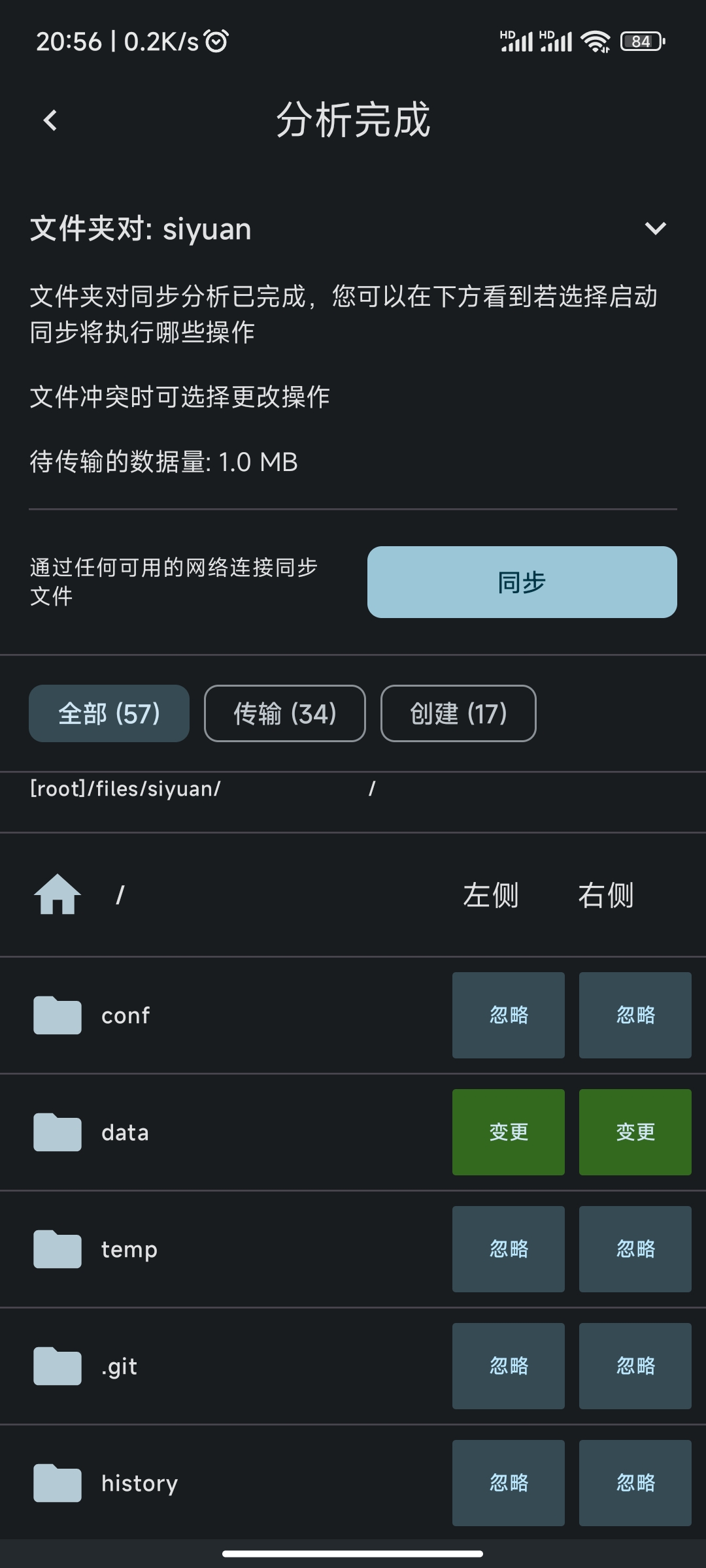
[!question]+ 是否支持 syncthing 同步?
安卓不能自定义工作空间路径. 希望Android版本也可以修改work space的位置 · Issue #3787 · siyuan-note/siyuan · GitHub
foldersync 貌似有办法访问 Android/data ?
[!question]+ 是否能够定时增量导出 md 文件?
[!tip]+ 模式切换-导出预览可以直接复制渲染后的格式.
https://ld246.com/article/1668672970787
https://blog.musnow.top/posts/1950951389
剪藏、发布
Tips
[!tip] 不支持脚注
[!tip] 不支持渲染裸链接
后记
选择思源笔记这类笔记软件, 意味着你将失去对你笔记数据的掌控, 即你无法简单地借助外部工具来处理那坨数据(比如同步、正则替换等操作), 而基本上只能完全仰赖该软件本身.
综合评价
- "Notion 离线版"
- 所见即所得
- Block: 远不如 notion 灵活, 但肯定比 obsidian 强
- Database: 只是个视图, 并且目前仅支持表格
- 集市
- 主题: 普遍缺乏类似 obsidian style-settings 那种统一的微调设置界面
- 插件
- 模板: 远不如 obsidian 的方便
- 挂件
- 数据
- 存储: json+数据库
- 资源
- 同步: 功能收费, 并且需上云
- 备份
- 导入
- 导出
- 剪藏: 有官方插件
- 发布: 有插件支持发布到各个平台
- 伺服: 可以把移动端当服务器, 在浏览器中使用. (间接解决同步问题)
- 部署: 支持 docker 部署
- 其他
- 大纲
- 双链
- 图谱
- 日记
- 闪卡
- AI